post.md
Oct 23, 2026 · 3 min read
How this site is built
A short tour of the architecture behind cmkrw.com, from the terminal layout to Markdown, charts, and error reporting.
- nextjs
- design
Contents
This site is small on purpose: one page, one blog, and as little JavaScript as I can get away with. Here is how the pieces fit together, in case you want to build something similar.
The terminal is the layout
The site is laid out like a terminal app. A tab bar runs along the top, a status line sits at the bottom, and everything in between is a pane: a bordered box with its title set into the top edge. One small component, Pane, draws all of them.
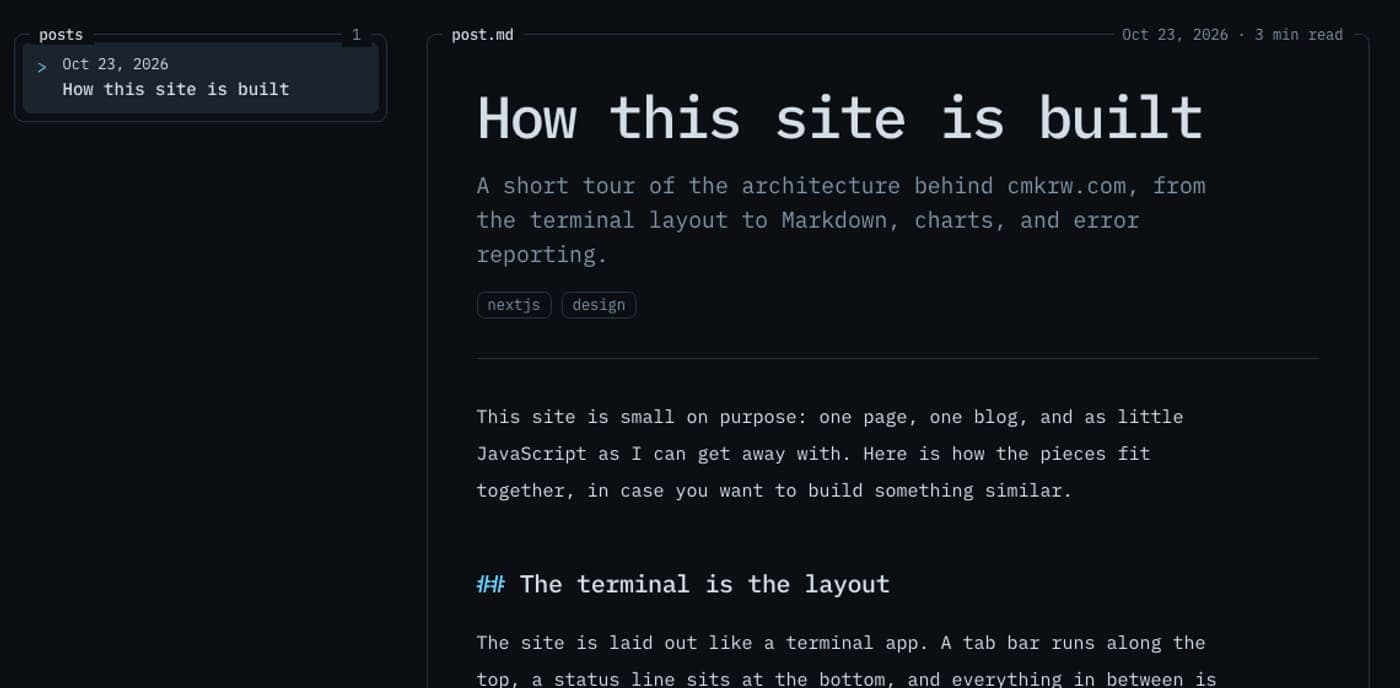 The blog as a master–detail view: the list stays put while the post changes.
Navigation follows the same idea. On the blog, the post list stays on the left while the post opens on the right, so moving between posts never needs a back link. The shortcuts work the way they would in a terminal, and you can sort this table by clicking a column header:
| 1 | Open home | global |
| 2 | Open blog | global |
| j | Scroll down | global |
| k | Scroll up | global |
| g g | Jump to top | global |
| G | Jump to bottom | global |
| n | Older post | blog |
| p | Newer post | blog |
| d | Toggle theme | global |
| ? | Show shortcuts | global |
The motion is mostly CSS. The hero command types out with a steps() animation, panes rise in as they scroll into view, and the line under the tab bar and the percentage in the status bar both track scroll position. Everything is switched off under prefers-reduced-motion.
Writing posts
Posts are plain Markdown files in content/blog/<slug>/<locale>.md, rendered with TanStack Markdown. A missing translation falls back to the English file, and draft: true keeps a post out of production builds.
Three pieces of TanStack tooling do the rest:
- Markdown parses and renders the post as React elements, with no HTML string in between.
- Highlight colors code blocks. Only the languages I register are bundled, and the colors come from the same CSS variables as the rest of the theme.
- Charts and Table are embedded with a one-line comment that names a JSON file next to the post.
Code blocks can carry a file title:
export function createEmbeds(slug: string, locale: string) {
  return {
    chart: ({ data = "", kind = "bar", x = "x", y = "y", title = "Chart" }) => (
      <TuiChart
        rows={getPostDataset(slug, data, locale)}
        kind={kind}
        x={x}
        y={y}
        label={title}
      />
    ),
  }
}
Plain Markdown tables work too, and pick up the same styling:
| Layer | Folder | Responsibility |
|---|---|---|
| Routes | app/ | Pages, metadata, icons, and images |
| UI | components/tui/ | Panes, navbar, status bar, keymap |
| Features | features/ | Home sections and the blog |
| Utilities | lib/, hooks/ | Metadata, observability, key input |
Here is how many source files live in each folder at the time of writing:
View data
| folder | files |
|---|---|
| app | 17 |
| components | 16 |
| lib | 16 |
| features | 15 |
| i18n | 4 |
| hooks | 3 |
| types | 1 |
Generated icons and social cards
Next.js 16 builds metadata images from files in the app/ directory:
icon.tsxandapple-icon.tsxrender the favicon and the iOS icon from a single SVG,assets/logo-icon.svg.opengraph-image.tsxrenders the social card for the home page, and a second one renders a card for each post.
There is no favicon.tsx. The docs are explicit that a favicon can't be generated, so icon.tsx does that job. All of these share one small set of primitives, so changing the brand mark changes the favicon and every social card at once.
Instrumentation
Two files handle observability. instrumentation.ts runs on the server and reports request errors. instrumentation-client.ts runs before hydration and tracks client errors, web vitals, and route changes. Both hand events to a reporter that fans them out to sinks:
export const serverReporter = createReporter([
  consoleSink,
  ...(endpoint ? [endpointSink(endpoint)] : []),
])
Client events are posted to /api/observability, which logs them. Pointing the reporter at a real collector later means adding one sink, not touching either entry file.
Translations
The site ships in ten languages, including right-to-left Arabic and Hebrew. Every string lives in one message file per locale; if a key is ever missing, the default locale's message is merged underneath, so a page never renders blank. Posts work the same way: each locale gets its own file, and a missing one falls back to English.